Get set up
Install the extension, connect the local companion, and check that your first app runs.
Before you start
Public downloads are paused while Sloppy 0.3.0 completes security and installed-browser verification. The steps below describe setup for a verified build; collaborators should use a separate test profile and workspace for the candidate.
- Browser: Google Chrome 138 or newer; use the latest stable version.
- For local development: macOS or Linux, Git, Bun, and collaborator access to the Sloppy repository. A Windows companion is not currently provided.
- Coding agent: your own Claude, Codex, or other coding agent account. Sloppy does not include model credits.
Edits apps in ~/.sloppy
Bundles and serves the apps
Runs apps on matching pages
1. Install the extension
- Check the release status. Once a verified download is available, extract its ZIP into a folder you intend to keep.
- Paste
chrome://extensionsinto Chrome’s address bar. - Turn on Developer mode. Choose Load unpacked and select the extracted folder containing
manifest.json, not the ZIP itself. - Open Sloppy’s Details. Enable Allow User Scripts if Chrome shows that option. Follow any permissions guidance in Sloppy.
- Open Chrome’s Extensions menu, pin Sloppy, and open its dashboard.
Keep the extracted folder in place. Chrome reads the unpacked extension from that location.
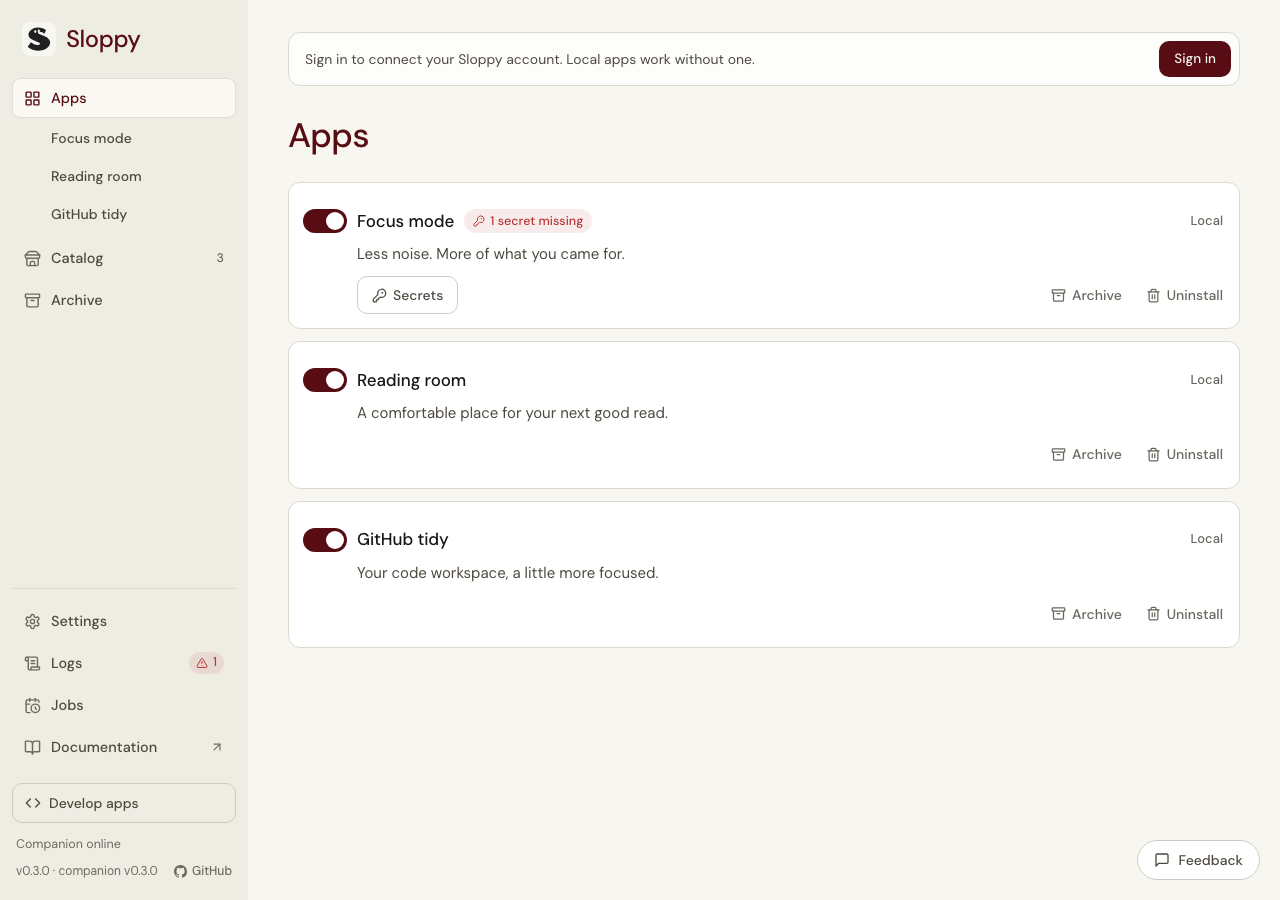
CheckSloppy appears in Chrome’s extension list with no loading errors, and its dashboard opens.
2. Connect the companion
With repository access, run the following in a terminal. These commands compile and register the native companion on this computer.
git clone https://github.com/rookasrudzianskas/sloppy.git
cd sloppy/host
bun install --frozen-lockfile
bun run build
./dist/sloppy install
Quit and reopen Chrome after installation so it picks up the native messaging registration. The companion starts through the extension and uses ~/.sloppy as your workspace.
command -v sloppy
sloppy browser tabs
If the first command prints nothing, open a fresh terminal. If it is still missing, return to the sloppy/host directory in the checkout you just built, then add its binary directory for this terminal session:
export PATH="$PWD/dist:$PATH"Keep this repository checkout in place. Chrome’s native messaging registration points to the compiled companion in host/dist; moving or deleting that checkout breaks the connection. After moving it, rebuild and run ./dist/sloppy install from its new host directory.
CheckThe CLI is found and sloppy browser tabs returns your Chrome tab information without a connection error.
3. Try an app
Open your coding agent in the generated workspace. For example, if the Claude CLI is already installed:
cd ~/.sloppy
claude
For Codex or another editor, open ~/.sloppy as the project folder. Ask the agent to read the workspace’s AGENTS.md and docs/ before building.
“Build a Sloppy app that hides YouTube Shorts. Include an app page with a setting to turn the change off. Test it on a fresh YouTube tab and check the error logs.”
Open the app in the Sloppy dashboard, check its settings, and visit a matching website in a new tab. Changes to userscripts take effect on the next page load; editing a file does not reload existing tabs.
Prefer a smaller example first? Follow the complete reading marker tutorial.
Update safely
Update the extension and companion together. Sloppy 0.3.0 needs both at version 0.3.0 or newer. When the verified download is available, extract it and replace the files in your unpacked extension folder, then use Chrome’s reload button for that extension. From your existing repository root:
git pull --ff-only
cd host
bun install --frozen-lockfile
bun run build
./dist/sloppy install
Restart Chrome, reopen the dashboard, and repeat the connection check. Back up your ~/.sloppy/apps folder before major updates. Do not delete your workspace to resolve a connection problem.